

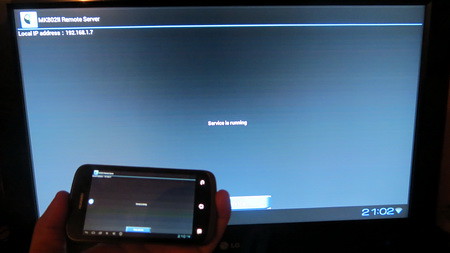
Hello folks. Thanks to leodfs & Adainair from Rigomagic MK802II Forum, we can now make use of the Remote Control application designed for our Android mini PC.
First of all you must download and install the Remote Server apk on the MK802II stick. You can download it from here. Second, download from here and install Remote Client on your smartphone or tablet.
Now, when you run for the first time the Remote server on the MK802II stick you got to introduce this info:
ID: 10022
password: f7d60eb6
Overview
MK802II Remote Client is a software that is used to control Rikomagic MK802II mini TV. You can control your MK802II mini TV easily.
Software Functions
1.Display & Remote Touch
Just touch the screen mapped from the server on what you see, Multi-touch is supported
In the state of auto refresh display mode in which the screen will refresh automatically
In the state of manual display mode in which the screen will only refresh a frame once you press the refresh button on the right
2.Remote GSensor
Transfer local Gravity sensor data to the server, you can play motion games on the TV.
GSensor Transfer Disabled
Enabled in Vertical Mode, mostly suitable for phones
Enabled in Horizontal Mode, mostly suitable for tablets
3.Remote MIC
working on progress......
4. Voice Control
Voice Control allows you to control your TV via your voice. The voice commands are limited. Google Voice Search app is needed.
5. Remote text input
you can send text to your TV, Now it supports voice-to-text input and all languages. voice-to-text also require Google Voice Search.
Instructions for use
1. Connect a WiFi network. firstly both your phone/tablet and your TV/server are needed to connect to the same WiFi LAN network.
2. Search devices. when connected WiFi successfully, your phone will search available server devices automatically. If your phone/tablet fails to search any server devices, you can connect your TV/server manually by entering an IP address.
3. Start control. when your phone has found some available TV devices,a start button will appear, and then you can press the start button and enjoy the tour of control.
Recent changes:
1. Remote Gravity Sensor supported, in both MobilePhone Mode(GsensorV) and Pad Mode (GsensorH).
2. Voice Control supported(limited commands), needed google voice search.
3. Text Input supported, including voice input.
Hi, what's the method for install the client on the phone?
RăspundețiȘtergere
RăspundețiȘtergereDownload the .apk file from the link above, copy it on the SD card (or send it attached in email, via DropBox or Google Drive, etc), browse for it and just install.
That's it!
Salut Dan,
RăspundețiȘtergereAi idee de ce nu merge ID-ul pentru pornirea serverului?
Incearca sa faci upgrade de firmware la Rikomagic MK802II versiunea 20121205, aceasta versiune are deja serverul preinstalat de la Remote Control, ai un tutorial aici - http://chinagadgetsreviews.blogspot.ro/2013/01/video-tutorial-rikomagic-mk802ii.html apoi te loghezi cu ID:10022
RăspundețiȘtergerepsw:f7d60eb6
Am probat aseara, functioneaza din prima.
Hello. How to start? I wrote "Activation failed." Maybe what I'm doing wrong?
RăspundețiȘtergereTry to upgrade the firmware to Rikomagic MK802II 20121205, this version has the Remote server included, maybe this works. See a video tutorial here http://chinagadgetsreviews.blogspot.ro/2013/01/video-tutorial-rikomagic-mk802ii.htm
RăspundețiȘtergereAlso, you can try DroidMote or try to use an air mouse - http://chinagadgetsreviews.blogspot.ro/2013/01/rikomagic-remote-droidmote-or-air-mouse.html
RăspundețiȘtergereSalut,
RăspundețiȘtergerePoti cumva sa-mi trimiti fisierul tylicense_app_7.dat din /data/system/tylicense_app_7.dat . Incerc sa instalez aplicatia de server pe un mk808B (iar daca functioneaza apoi si pe altele), dar activarea nu merge. Am decompilat APK-ul, si teoretic acolo ar trebui sa fie salvate informatii odata ce serverul a fost activat. Mai am si varianta sa modific APK-ul, ca sa nu mai faca nici o validare.
Mersi
Maxi
maxi2mc @ yahoo
salut... de curand sunt posesorul unui rikomagic MK802 IIIs, nu reusesc deloc sa folosesc telefonul cu android pe post de telecomanda... ma poti ajuta te rog cu un sfat? multumesc anticipat
RăspundețiȘtergereUite aici - http://touchscreen-apps.blogspot.ro/2013/01/rikomagic-remote-droidmote-or-air-mouse.html
RăspundețiȘtergereAplicatia funnctioneaza si pe un MK809 III sau stii de unde pot instala una compatibila?
RăspundețiȘtergere@gaius
RăspundețiȘtergereDescarca de aici --> http://www.rikomagic.com/en/download/download_24_1.html
Salut.detin si eu un mk 809iii., android 4.4.2, am incecat linku de mai sus., dar nu merge sa conectez telefonul.alte aplicatii a folosit cineva?
RăspundețiȘtergere@popa dumitru
RăspundețiȘtergereFunctioneaza doar pe device-urile Rikomagic, al tau nu este model RKM.
Detalii pe http://www.rikomagic.com/en/download/download_44_1.html
Ok.ms.o aplicatie pt modelul meu exista?
RăspundețiȘtergere